Class: Image
- class pykitPIV.image.ImageSpecs(n_images=1, size=(512, 512), size_buffer=10, random_seed=None, exposures=(0.5, 1), maximum_intensity=65535, laser_beam_thickness=1, laser_over_exposure=1, laser_beam_shape=0.95, no_laser_plane=False, alpha=0.125, extend_gaussian=1, covariance_matrix=None, clip_intensities=True, normalize_intensities=False, dtype=<class 'numpy.float64'>)
Configuration object for the
Imageclass.Example:
from pykitPIV import ImageSpecs

# Instantiate an object of ImageSpecs class:
image_spec = ImageSpecs()

# Change one field of motion_spec:
image_spec.exposures = 0.95

# You can print the current values of all attributes:
print(image_spec)
- class pykitPIV.image.Image(verbose=False, dtype=<class 'numpy.float64'>, random_seed=None)
Stores and plots synthetic PIV images and/or the associated flow targets at any stage of particle generation and movement.
Example:
from pykitPIV import Image
import numpy as np

# Initialize an image object:
image = Image(verbose=False,
              dtype=np.float32,
              random_seed=100)
- Parameters:
verbose – (optional)
boolspecifying if the verbose print statements should be displayed.dtype – (optional)
numpy.dtypespecifying the data type for image intensities. To reduce memory, you can switch from the defaultnumpy.float64tonumpy.float32.random_seed – (optional)
intspecifying the random seed for random number generation innumpy. If specified, all operations are reproducible.
Attributes:
verbose - (read-only) as per user input.
dtype - (read-only) as per user input.
random_seed - (read-only) as per user input.
images_I1 - (read-only)
numpy.ndarrayof size \((N, C_{in}, H+2b, W+2b)\), where \(N\) is the number PIV image pairs, \(C_{in}\) is the number of channels (one channel, greyscale, is supported at the moment), \(H\) is the height and \(W\) is the width of each PIV image, \(I_1\), and \(b\) is the optional buffer. Only available afterImage.add_particles()has been called.images_I2 - (read-only)
numpy.ndarrayof size \((N, C_{in}, H+2b, W+2b)\), where \(N\) is the number PIV image pairs, \(C_{in}\) is the number of channels (one channel, greyscale, is supported at the moment), \(H\) is the height and \(W\) is the width of each PIV image, \(I_2\), and \(b\) is the optional buffer. Only available afterImage.add_motion()has been called.exposures_per_image - (read-only)
numpy.ndarrayspecifying the template for the light exposure for each image. Only available afterImage.add_reflected_lighthas been called.maximum_intensity - (read-only)
intspecifying the maximum intensity that was used when adding reflected light to the image. Only available afterImage.add_reflected_lighthas been called.
- pykitPIV.image.Image.add_particles(self, particles)
Adds particles to the image. Particles should be defined using the
Particleclass.Calling this function populates the
image.images_I1attribute and the private attributeimage.__particleswhich gives the user access to attributes from theParticleobject.Example:
from pykitPIV import Particle, Image

# Initialize a particle object:
particles = Particle(1,
                     size=(128, 512),
                     size_buffer=10,
                     random_seed=100)

# Initialize an image object:
image = Image(random_seed=100)

# Add particles to an image:
image.add_particles(particles)
- Parameters:
particles –
Particleclass instance specifying the properties and positions of particles.
- pykitPIV.image.Image.add_flowfield(self, flowfield)
Adds the flow field to the image. The flow field should be defined using the
FlowFieldclass.Calling this function populates the private attribute
image.__flowfieldwhich gives the user access to attributes from theFlowFieldobject.Example:
from pykitPIV import FlowField, Image

# Initialize a flow field object:
flowfield = FlowField(1,
                      size=(128, 512),
                      size_buffer=10,
                      time_separation=1,
                      random_seed=100)

# Initialize an image object:
image = Image(random_seed=100)

# Add flow field to an image:
image.add_flowfield(flowfield)
- Parameters:
flowfield –
FlowFieldclass instance specifying the flow field.
- pykitPIV.image.Image.add_motion(self, motion)
Adds particle movement to the image. The movement should be defined using the
Motionclass.Calling this function populates the private attribute
image.__motionwhich gives the user access to attributes from theMotionobject.Example:
from pykitPIV import Particle, FlowField, Motion, Image

# Initialize a particle object:
particles = Particle(1,
                     size=(128, 512),
                     size_buffer=10,
                     random_seed=100)

# Initialize a flow field object:
flowfield = FlowField(1,
                      size=(128, 512),
                      size_buffer=10,
                      time_separation=1,
                      random_seed=100)

# Initialize a motion object:
motion = Motion(particles, flowfield)

# Initialize an image object:
image = Image(random_seed=100)

# Add motion to an image:
image.add_motion(motion)
- Parameters:
motion –
Motionclass instance specifying the movement of particles from one instance in time to the next. In general, the movement is defined by theFlowFieldclass applied to particles defined by theParticleclass.
- pykitPIV.image.Image.get_velocity_field(self)
Returns the velocity field from the object of the
FlowFieldclass.Example:
from pykitPIV import Particle, FlowField, Image

# Initialize a particle object:
particles = Particle(1,
                     size=(128, 512),
                     size_buffer=10,
                     random_seed=100)

# Initialize a flow field object:
flowfield = FlowField(1,
                      size=(128, 512),
                      size_buffer=10,
                      time_separation=1,
                      random_seed=100)

# Generate random velocity field:
flowfield.generate_random_velocity_field(displacement=(0, 10),
                                         gaussian_filters=(10, 30),
                                         n_gaussian_filter_iter=6)

# Initialize an image object:
image = Image(random_seed=100)

# Add flow field to an image:
image.add_flowfield(flowfield)

# Access the velocity field:
V = image.get_velocity_field()
- Returns:
velocity_field - as per
FlowFieldclass.
- pykitPIV.image.Image.get_velocity_field_magnitude(self)
Returns the velocity field magnitude from the object of the
FlowFieldclass.Example:
from pykitPIV import Particle, FlowField, Image

# Initialize a particle object:
particles = Particle(1,
                     size=(128, 512),
                     size_buffer=10,
                     random_seed=100)

# Initialize a flow field object:
flowfield = FlowField(1,
                      size=(128, 512),
                      size_buffer=10,
                      time_separation=1,
                      random_seed=100)

# Generate random velocity field:
flowfield.generate_random_velocity_field(displacement=(0, 10),
                                         gaussian_filters=(10, 30),
                                         n_gaussian_filter_iter=6)

# Initialize an image object:
image = Image(random_seed=100)

# Add flow field to an image:
image.add_flowfield(flowfield)

# Access the velocity field magnitude:
V_mag = image.get_velocity_field_magnitude()
- Returns:
velocity_field_magnitude - as per
FlowFieldclass.
- pykitPIV.image.Image.get_displacement_field(self)
Returns the displacement field from the object of the
FlowFieldclass.Example:
from pykitPIV import FlowField, Image

# Initialize a flow field object:
flowfield = FlowField(1,
                      size=(128, 512),
                      size_buffer=10,
                      time_separation=0.1,
                      random_seed=100)

# Generate random velocity field:
flowfield.generate_random_velocity_field(displacement=(0, 10),
                                         gaussian_filters=(10, 30),
                                         n_gaussian_filter_iter=6)

# Initialize an image object:
image = Image(random_seed=100)

# Add motion to an image:
image.add_flowfield(flowfield)

# Access the displacement field:
ds = image.get_displacement_field()
- Returns:
displacement_field - as per
FlowFieldclass.
- pykitPIV.image.Image.get_displacement_field_magnitude(self)
Returns the displacement field magnitude from the object of the
FlowFieldclass.Example:
from pykitPIV import FlowField, Image

# Initialize a flow field object:
flowfield = FlowField(1,
                      size=(128, 512),
                      size_buffer=10,
                      time_separation=0.1,
                      random_seed=100)

# Generate random velocity field:
flowfield.generate_random_velocity_field(displacement=(0, 10),
                                         gaussian_filters=(10, 30),
                                         n_gaussian_filter_iter=6)

# Initialize an image object:
image = Image(random_seed=100)

# Add motion to an image:
image.add_flowfield(flowfield)

# Access the displacement field magnitude:
ds_mag = image.get_displacement_field_magnitude()
- Returns:
displacement_field_magnitude - as per
FlowFieldclass.
- pykitPIV.image.Image.compute_light_intensity_at_pixel(self, peak_intensity, particle_diameter, coordinate_height, coordinate_width, alpha=0.125, covariance_matrix=None)
Computes the intensity of light reflected from a particle at a requested pixel at position relative to the particle centroid.
The reflected light follows a Gaussian distribution which can be either univariate (in which case particles are spherical Gaussians) or covariate (in which case particles have an elongated shape).
For a univariate distrubution, the light intensity value, \(i_p\), at the requested pixel, \(p\), is computed as:
\[i_p = i_{\text{peak}} \cdot \exp \Big(- \frac{h_p^2 + w_p^2}{\alpha \cdot d_p^2} \Big)\]where:
\(i_{\text{peak}}\) is the peak intensity applied at the particle centroid.
\(h_p\) is the pixel coordinate in the image height direction relative to the particle centroid.
\(w_p\) is the pixel coordinate in the image width direction relative to the particle centroid.
\(\alpha\) is a custom multiplier, \(\alpha\). The default value is \(\alpha = 1/8\).
\(d_p\) is the particle diameter.
For a covariate distrubution, the light intensity value, \(i_p\), at the requested pixel, \(p\), is computed as:
\[i_p = i_{\text{peak}} \cdot \exp \Big(- \frac{\mathbf{r} \cdot \mathbf{C}^{-1} \cdot \mathbf{r}^{\top}}{\alpha \cdot d_p^2} \Big)\]where:
\(\mathbf{C}\) is the covariance matrix that is positive semi-definite and \(\mathbf{C}^{-1}\) is its inverse.
\(\mathbf{r}\) is the position vector, \(\mathbf{r} = [w_p, h_p]\).
- Parameters:
peak_intensity –
floatspecifying the peak intensity, \(i_{\text{peak}}\), to apply at the particle centroid.particle_diameter –
floatspecifying the particle diameter \(d_p\).coordinate_height –
floatspecifying the pixel coordinate in the image height direction, \(h_p\), relative to the particle centroid.coordinate_width –
floatspecifying the pixel coordinate in the image width direction, \(w_p\), relative to the particle centroid.alpha – (optional):
floatspecifying the custom multiplier, \(\alpha\), for the squared particle radius. The default and recommended value is \(1/8\) as per Raffel et al. (2018), Rabault et al. (2017) and Manickathan et al. (2022).covariance_matrix – (optional):
numpy.ndarrayspecifying the covariance matrix that has to be positive semi-definite. If set toNone, the particle images will be generated from a univariate distrubtion (as spherical Gaussians). It has to have size(2, 2).
- Returns:
pixel_value -
floatspecifying the light intensity value at the requested pixel.
- pykitPIV.image.Image.add_reflected_light(self, exposures=(0.5, 1), maximum_intensity=65535, laser_beam_thickness=2, laser_over_exposure=1, laser_beam_shape=0.85, no_laser_plane=False, alpha=0.125, extend_gaussian=1, covariance_matrix=None, clip_intensities=True, normalize_intensities=False)
Creates particle shapes and adds laser light reflected from particles.
The reflected light follows a Gaussian distribution and is computed using the
Image.compute_light_intensity_at_pixel()method.The particle shapes can be spherical Gaussians or can have a non-zero covariance. In the latter case, the user has to provide a full covariance matrix that is positive semi-definite.
Example:
from pykitPIV import Particle, Image

# Initialize a particle object:
particles = Particle(1,
                     size=(128, 512),
                     size_buffer=10)

# Initialize an image object:
image = Image(random_seed=100)

# Add particles to an image:
image.add_particles(particles)

# Add reflected light to an image:
image.add_reflected_light(exposures=(0.5, 0.9),
                          maximum_intensity=2**16-1,
                          laser_beam_thickness=1,
                          laser_over_exposure=1,
                          laser_beam_shape=0.95,
                          no_laser_plane=False,
                          alpha=1/8,
                          extend_gaussian=1,
                          covariance_matrix=None,
                          clip_intensities=True,
                          normalize_intensities=False)
Alternatively, we can model astigmatic PIV by providing a coviariance matrix:
Example:
# Define a full, positive semi-definite covariance matrix:
covariance_matrix = np.array([[3.0, -2],
                              [-2, 2.0]])

# Add reflected light to an image:
image.add_reflected_light(exposures=(0.5, 0.9),
                          maximum_intensity=2**16-1,
                          laser_beam_thickness=1,
                          laser_over_exposure=1,
                          laser_beam_shape=0.95,
                          no_laser_plane=False,
                          alpha=1/8,
                          extend_gaussian=1,
                          covariance_matrix=covariance_matrix,
                          clip_intensities=True,
                          normalize_intensities=False)
- Parameters:
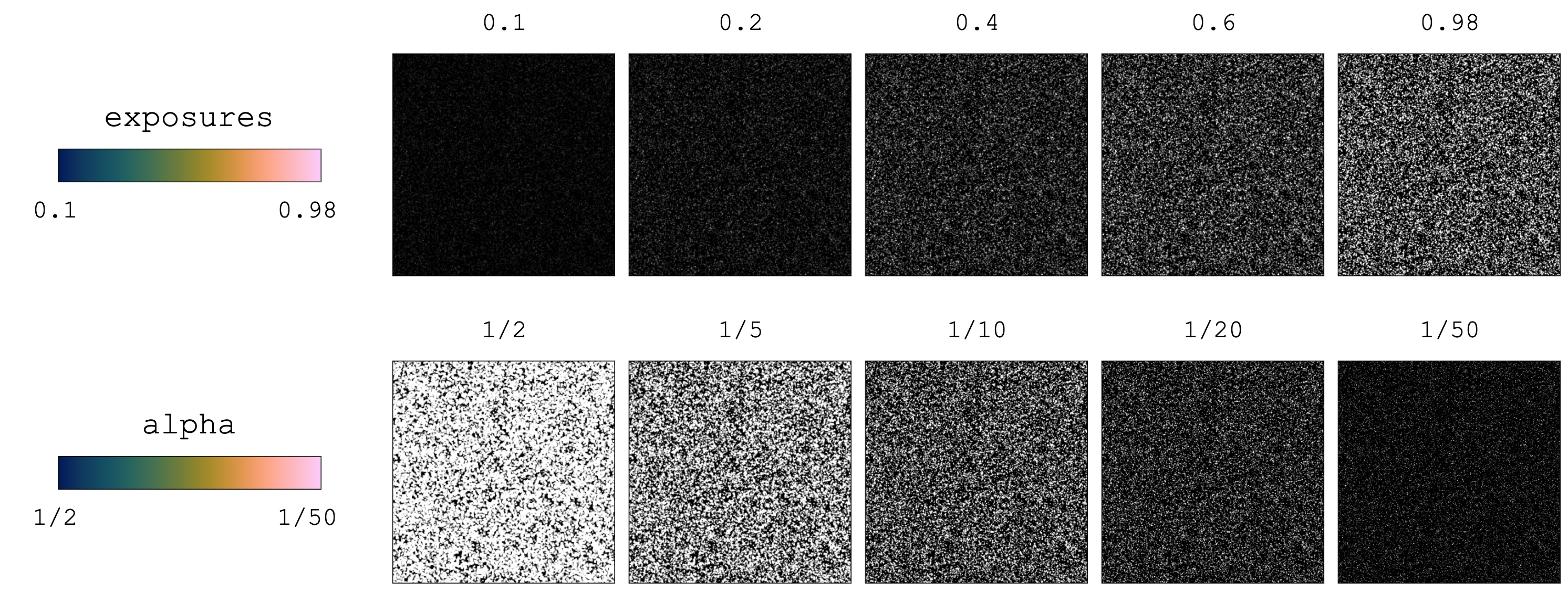
exposures – (optional)
tupleof two numerical elements specifying the minimum (first element) and maximum (second element) light exposure. It can also be set tointorfloatto generate a fixed exposure value across all \(N\) image pairs.maximum_intensity – (optional)
intspecifying the maximum light intensity. This will be the brightest possible pixel, which will only happen if the particle is located at the center of that pixel and at the center of the laser plane. All particles with an offset with respect to the laser plane will have a lower intensity than the maximum.laser_beam_thickness – (optional)
intorfloatspecifying the thickness of the laser beam. With a small thickness, particles that are even slightly off-plane will appear darker. Note, that the thicker the laser plane, the larger the distance that the particle can travel away from the laser plane to lose its luminosity.laser_over_exposure – (optional)
intorfloatspecifying the overexposure of the laser beam.laser_beam_shape – (optional)
intorfloatspecifying the spread of the Gaussian shape of the laser beam. The larger this number is, the wider the Gaussian light distribution from the laser and more particles will be illuminated.no_laser_plane – (optional)
boolspecifying whether the laser plane is used to illuminate particles. For PIV images, set toFalse. For BOS images set toTrue.alpha –
(optional):
floatspecifying the custom multiplier, \(\alpha\), for the squared particle radius as per theParticle.compute_light_intensity_at_pixel()method. The default and recommended value is \(1/8\) as per Raffel et al. (2018), Rabault et al. (2017) and Manickathan et al. (2022).extend_gaussian – (optional):
intspecifying the multiple of the particle radius to be filled with the Gaussian blur. For BOS images, it is recommended to increase this number to, say, 2. For PIV images, it can be equal to 1. Note that a higher number will increase the computation time for adding light intensity to images.covariance_matrix – (optional):
numpy.ndarrayspecifying the covariance matrix that has to be positive semi-definite. If set toNone, the particle images will be generated from a univariate distrubtion (as spherical Gaussians). It has to have size(2, 2).clip_intensities – (optional):
boolspecifying whether the image intensities should be clipped if any pixel exceeds the maximum light intensity. Only one ofclip_intensities,normalize_intensitiescan beTrue.normalize_intensities – (optional):
boolspecifying whether the image intensities should be normalized if any pixel exceeds the maximum light intensity. Only one ofclip_intensities,normalize_intensitiescan beTrue.
- pykitPIV.image.Image.warp_images(self, time_separation=1, order=1, mode='constant')
Warps images according to the velocity field. This function can be used to produce \(I_2\) in background-oriented Schlieren (BOS) by warping \(I_1\).
Note
This function uses
scipy.ndimage.map_coordinatesto warp images.Example:
from pykitPIV import Particle, FlowField, Image

# We are going to generate 10 BOS image pairs:
n_images = 10

# Specify size in pixels for each image:
image_size = (512, 512)

# Initialize a particle object:
particles = Particle(n_images,
                     size=image_size,
                     size_buffer=10,
                     diameters=10,
                     distances=1,
                     densities=1.2,
                     diameter_std=0,
                     seeding_mode='poisson',
                     random_seed=100)

# Initialize an image object:
image = Image(random_seed=100)
image.add_particles(particles)

image.add_reflected_light(exposures=0.99,
                          maximum_intensity=2**16-1,
                          no_laser_plane=True,
                          alpha=1/8,
                          extend_gaussian=2)

# Initialize a flow field object:
flowfield = FlowField(n_images,
                      size=image_size,
                      size_buffer=10,
                      time_separation=1,
                      random_seed=100)

flowfield.generate_potential_velocity_field(imposed_origin=None,
                                            displacement=(2, 2))


image.add_flowfield(flowfield)

# Warp images:
image.warp_images(time_separation=10)
- Parameters:
time_separation –
floatorintspecifying the time separation, \(\Delta t\), that will scale the velocity field to obtain a displacement field.order –
intspecifying the order of the spline interpolation as perscipy.ndimage.map_coordinates. It has to be a number between 0 and 5.mode –
strspecifying how the input array is extended beyond its boundaries. With sufficient buffer size this should not affect the proper image area.
- pykitPIV.image.Image.remove_buffers(self, input_tensor)
Removes image buffers from the input tensor. If the input tensor is a four-dimensional array of size \((N, \_, H+2b, W+2b)\), then the output is a four-dimensional tensor array of size \((N, \_, H, W)\).
Example:
from pykitPIV import Particle, Image

# Initialize a particle object:
particles = Particle(10,
                     size=(128, 512),
                     size_buffer=10)

# Initialize an image object:
image = Image(random_seed=100)

# Add particles to an image:
image.add_particles(particles)

# Add reflected light to an image:
image.add_reflected_light(exposures=(0.5, 0.9),
                          maximum_intensity=2**16-1,
                          laser_beam_thickness=1,
                          laser_over_exposure=1,
                          laser_beam_shape=0.95,
                          alpha=1/8,
                          covariance_matrix=None,
                          clip_intensities=True,
                          normalize_intensities=False)

# Remove buffers from the first image frame:
images_I1 = image.remove_buffers(image.images_I1)
- Parameters:
input_tensor –
numpy.ndarrayspecifying the input tensor. It has to have size \((N, C_{in}, H+2b, W+2b)\).- Returns:
input_tensor -
numpy.ndarrayspecifying the input tensor with buffers removed. It has size \((N, C_{in}, H, W)\).
- pykitPIV.image.Image.measure_counts(self, image)
Measures the number of light intensity counts in a given image.
Example:
from pykitPIV import Particle, Image

# Initialize a particle object:
particles = Particle(10,
                     size=(20, 20),
                     size_buffer=0)

# Initialize an image object:
image = Image(random_seed=100)

# Add particles to an image:
image.add_particles(particles)

# Add reflected light to an image:
image.add_reflected_light(exposures=(0.5, 0.9),
                          maximum_intensity=2**16-1,
                          laser_beam_thickness=1,
                          laser_over_exposure=1,
                          laser_beam_shape=0.95,
                          alpha=1/8,
                          covariance_matrix=None,
                          clip_intensities=True,
                          normalize_intensities=False)

# Measure light intensity counts:
counts_dictionary = image.measure_counts(image.images_I1[0,:,:])
- Parameters:
image –
numpy.ndarrayspecifying the single PIV image.- Returns:
counts_dictionary -
dictspecifying the measured counts. Keys are pixel intensities and values are the number of occurrence of the given intensity in the image.
- pykitPIV.image.Image.concatenate_tensors(self, input_tensor_tuple)
Concatenates multiple four-dimensional tensor arrays along the second dimension (the “channel” dimension).
Example:
from pykitPIV import Particle, FlowField, Motion, Image

# Initialize a particle object:
particles = Particle(1,
                     size=(128, 512),
                     size_buffer=10,
                     random_seed=100)

# Initialize a flow field object:
flowfield = FlowField(1,
                      size=(128, 512),
                      size_buffer=10,
                      time_separation=1,
                      random_seed=100)

# Generate random velocity field:
flowfield.generate_random_velocity_field(displacement=(0, 10),
                                         gaussian_filters=(10, 30),
                                         n_gaussian_filter_iter=6)

# Initialize a motion object:
motion = Motion(particles, flowfield)
motion.runge_kutta_4th(n_steps=10)

# Initialize an image object:
image = Image(random_seed=100)

# Add motion to an image:
image.add_motion(motion)

# Add particles to an image:
image.add_particles(particles)

# Add light reflected from particles:
image.add_reflected_light(exposures=(0.6, 0.65),
                          maximum_intensity=2**16-1,
                          laser_beam_thickness=1,
                          laser_over_exposure=1,
                          laser_beam_shape=0.95,
                          alpha=1/10)

# Concatenate image frames:
I = image.concatenate_tensors((image.images_I1,
                               image.images_I2))
- Returns:
input_tensor_tuple -
tupleofnumpy.ndarrayspecifying the four-dimensional tensors to concatenate. Eachnumpy.ndarrayshould have size \((N, \_, H, W)\), where \(N\) is the number of PIV image pairs, \(H\) is the height and \(W\) is the width of each PIV image. The second dimension refers to items being concatenated.
- pykitPIV.image.Image.save_to_tiff(self, image_tensor, filename=None, verbose=False)
Saves the image pairs tensor to individual
.tiffimages.Example:
from pykitPIV import Particle, FlowField, Motion, Image

# We are going to generate 4 PIV image pairs:
n_images = 4

# Specify size in pixels for each image:
image_size = (256, 256)

# Initialize a particle object:
particles = Particle(n_images=n_images,
                     size=image_size,
                     size_buffer=10,
                     diameters=(2, 4),
                     distances=(1, 2),
                     densities=(0.01, 0.05),
                     diameter_std=(0.1, 1),
                     seeding_mode='random',
                     random_seed=100)

# Initialize a flow field object:
flowfield = FlowField(n_images=n_images,
                      size=image_size,
                      size_buffer=10,
                      time_separation=1,
                      random_seed=100)

# Generate random velocity field:
flowfield.generate_random_velocity_field(gaussian_filters=(2, 10),
                                         n_gaussian_filter_iter=10,
                                         displacement=(2, 5))

# Initialize a motion object:
motion = Motion(particles,
                flowfield,
                particle_loss=(0, 2),
                particle_gain='matching',
                verbose=False,
                random_seed=None)

# Advect particles:
motion.forward_euler(n_steps=10)

# Initialize an image object:
image = Image(random_seed=100)

# Add particles to an image:
image.add_particles(particles)

# Add flow field to an image:
image.add_flowfield(flowfield)

# Add motion to an image:
image.add_motion(motion)

# Add reflected light to an image:
image.add_reflected_light(exposures=(0.5, 0.9),
                          maximum_intensity=2**16-1,
                          laser_beam_thickness=1,
                          laser_over_exposure=1,
                          laser_beam_shape=0.95,
                          alpha=1/8,
                          covariance_matrix=None,
                          clip_intensities=True,
                          normalize_intensities=False)

# Remove buffers from images:
images_I1 = image.remove_buffers(image.images_I1)
images_I2 = image.remove_buffers(image.images_I2)

# Prepare an image pairs tensor to save:
images_intensities = image.concatenate_tensors((images_I1, images_I2))

# Save images to .tiff:
image.save_to_tiff(images_intensities,
                   filename='dataset',
                   verbose=True)
- Parameters:
image_tensor –
numpy.ndarrayspecifying the image pairs tensor to save. It should be of size \((N, 2, H, W)\).filename – (optional)
strspecifying the path and filename to save the.tiffimages. Note that'-#-I1'or'-#-I2'will be added automatically to your filename for each saved image. If set toNone, a default name'PIV-dataset-#-I1.tiff'or'PIV-dataset-#-I2.tiff'will be used.verbose – (optional)
boolfor printing verbose details.
- pykitPIV.image.Image.save_to_h5(self, tensors_dictionary, save_individually=False, filename=None, verbose=False)
Saves the image pairs tensor and/or the associated flow targets tensor to
.h5data format.Example:
from pykitPIV import Particle, FlowField, Motion, Image

# We are going to generate 10 PIV image pairs:
n_images = 10

# Specify size in pixels for each image:
image_size = (128, 512)

# Initialize a particle object:
particles = Particle(n_images=n_images,
                     size=image_size,
                     size_buffer=10,
                     diameters=(2, 4),
                     distances=(1, 2),
                     densities=(0.01, 0.05),
                     diameter_std=(0.1, 1),
                     seeding_mode='random',
                     random_seed=100)

# Initialize a flow field object:
flowfield = FlowField(n_images=n_images,
                      size=image_size,
                      size_buffer=10,
                      time_separation=1,
                      random_seed=100)

# Generate random velocity field:
flowfield.generate_random_velocity_field(gaussian_filters=(2, 10),
                                         n_gaussian_filter_iter=10,
                                         displacement=(2, 5))

# Initialize a motion object:
motion = Motion(particles,
                flowfield,
                particle_loss=(0, 2),
                particle_gain='matching',
                verbose=False,
                random_seed=None)

# Advect particles:
motion.forward_euler(n_steps=10)

# Initialize an image object:
image = Image(random_seed=100)

# Add particles to an image:
image.add_particles(particles)

# Add flow field to an image:
image.add_flowfield(flowfield)

# Add motion to an image:
image.add_motion(motion)

# Add reflected light to an image:
image.add_reflected_light(exposures=(0.5, 0.9),
                          maximum_intensity=2**16-1,
                          laser_beam_thickness=1,
                          laser_over_exposure=1,
                          laser_beam_shape=0.95,
                          alpha=1/8,
                          covariance_matrix=None,
                          clip_intensities=True,
                          normalize_intensities=False)

# Remove buffers from images:
images_I1 = image.remove_buffers(image.images_I1)
images_I2 = image.remove_buffers(image.images_I2)

# Remove buffers from targets:
velocity_field = image.remove_buffers(image.get_velocity_field())
displacement_field = image.remove_buffers(image.get_displacement_field())

# Prepare a tensors dictionary to save:
images_intensities = image.concatenate_tensors((images_I1, images_I2))
flow_targets = image.concatenate_tensors((velocity_field, displacement_field))

tensors_dictionary = {"I"      : images_intensities,
                      "target" : flow_targets}

# Save tensors to h5:
image.save_to_h5(tensors_dictionary,
                 save_individually=False,
                 filename='dataset.h5',
                 verbose=True)
- Parameters:
tensors_dictionary –
dictspecifying the tensors to save.save_individually – (optional)
boolspecifying if each image pair and the associated targets should be saved to a separate file. It is recommended to save individually for large datasets that will be uploaded by PyTorch, since at any iteration of a machine learning algorithm, only a small batch of samples is uploaded to memory.filename – (optional)
strspecifying the path and filename to save the.h5data. Note that'-pair-#'will be added automatically to your filename for each saved image pair. If set toNone, a default name'PIV-dataset-pair-#.h5'will be used.verbose – (optional)
boolfor printing verbose details.
- pykitPIV.image.Image.upload_from_h5(self, filename=None)
Upload image pairs tensor and/or the associated flow targets tensor from
.h5data format.Example:
from pykitPIV import Image

# Instantiate an empty image object:
image = Image()

# Upload the saved dataset to the empty image object:
tensors_dictionary_uploaded = image.upload_from_h5(filename='dataset.h5')
- Parameters:
filename – (optional)
strspecifying the path and filename to save the.h5data. Note that'-pair-#'will be added automatically to your filename for each saved image pair. If set toNone, a default name'PIV-dataset-pair-#.h5'will be used.- Returns:
tensors_dictionary -
dictspecifying the dataset tensors.
- pykitPIV.image.Image.plot(self, idx, instance=1, with_buffer=False, xlabel=None, ylabel=None, xticks=True, yticks=True, title=None, cmap='Greys_r', cbar=False, origin='lower', figsize=(5, 5), dpi=300, filename=None)
Plots a single, static PIV image, \(I_1\) or \(I_2\).
- Parameters:
idx –
intspecifying the index of the image to plot out ofn_imagesnumber of images.instance – (optional)
intspecifying whether \(I_1\) (instance=1) or \(I_2\) (instance=2) should be plotted.with_buffer – (optional)
boolspecifying whether the buffer for the image size should be visualized. If set toFalse, the true PIV image size is visualized. If set toTrue, the PIV image with a buffer is visualized and buffer outline is marked with a red rectangle.xlabel – (optional)
strspecifying \(x\)-label.ylabel – (optional)
strspecifying \(y\)-label.xticks – (optional)
boolspecifying if ticks along the \(x\)-axis should be plotted.yticks – (optional)
boolspecifying if ticks along the \(y\)-axis should be plotted.title – (optional)
strspecifying figure title.cmap – (optional)
stror an object of matplotlib.colors.ListedColormap specifying the color map to use.cbar – (optional)
boolspecifying whether colorbar should be plotted.origin – (optional)
strspecifying the origin location. It can be'upper'or'lower'.figsize – (optional)
tupleof two numerical elements specifying the figure size as permatplotlib.pyplot.dpi – (optional)
intspecifying the dpi for the image.filename – (optional)
strspecifying the path and filename to save an image. If set toNone, the image will not be saved.
- Returns:
plt -
matplotlib.pyplotimage handle.
- pykitPIV.image.Image.plot_image_pair(self, idx, with_buffer=False, xlabel=None, ylabel=None, xticks=True, yticks=True, title=None, cmap='Greys_r', cbar=False, origin='lower', figsize=(5, 5), dpi=300, filename=None)
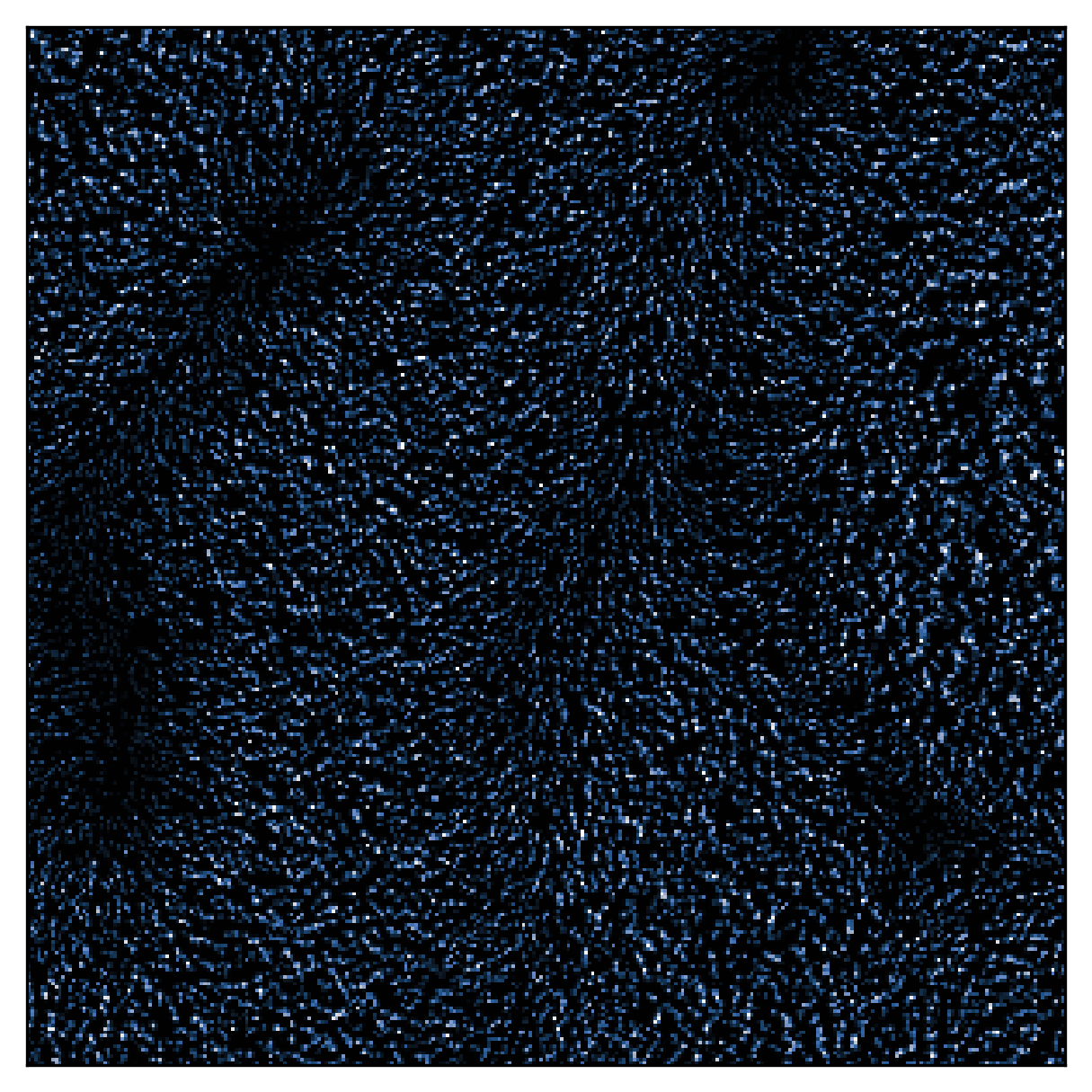
Plots a PIV image pair on single, static PIV image by superimposing \(I_1 - I_2\).
Example:
Given the following velocity field magnitude:
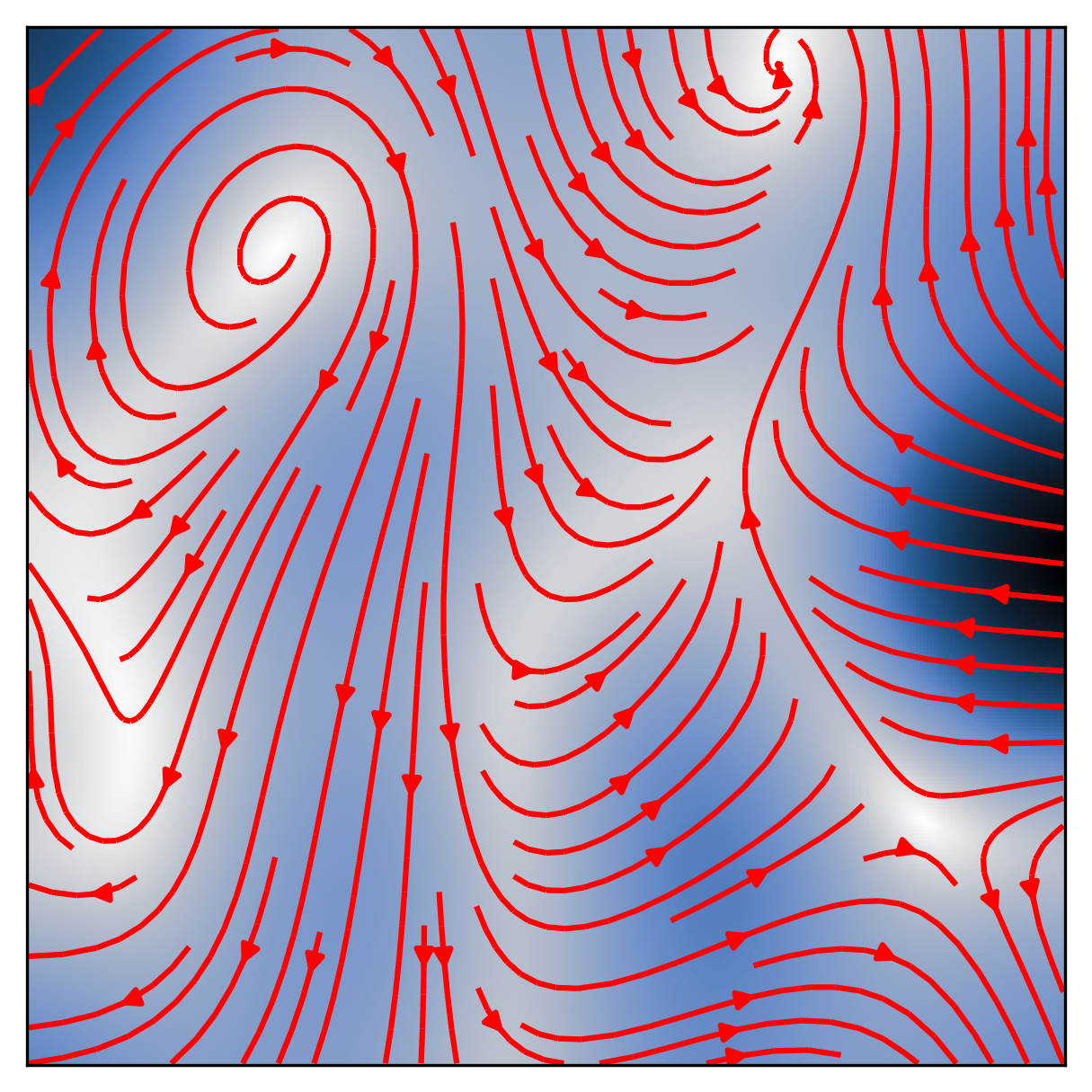
This function will produce the following image:
- Parameters:
idx –
intspecifying the index of the image to plot out ofn_imagesnumber of images.with_buffer – (optional)
boolspecifying whether the buffer for the image size should be visualized. If set toFalse, the true PIV image size is visualized. If set toTrue, the PIV image with a buffer is visualized and buffer outline is marked with a red rectangle.xlabel – (optional)
strspecifying \(x\)-label.ylabel – (optional)
strspecifying \(y\)-label.xticks – (optional)
boolspecifying if ticks along the \(x\)-axis should be plotted.yticks – (optional)
boolspecifying if ticks along the \(y\)-axis should be plotted.title – (optional)
strspecifying figure title.cmap –
(optional)
stror an object of matplotlib.colors.ListedColormap specifying the color map to use.cbar – (optional)
boolspecifying whether colorbar should be plotted.origin – (optional)
strspecifying the origin location. It can be'upper'or'lower'.figsize – (optional)
tupleof two numerical elements specifying the figure size as permatplotlib.pyplot.dpi – (optional)
intspecifying the dpi for the image.filename – (optional)
strspecifying the path and filename to save an image. If set toNone, the image will not be saved.
- Returns:
plt -
matplotlib.pyplotimage handle.
- pykitPIV.image.Image.animate_image_pair(self, idx, with_buffer=False, xlabel=None, ylabel=None, title=None, cmap='Greys_r', cbar=False, origin='lower', figsize=(5, 5), dpi=300, filename=None)
Plots an animated PIV image pair, \(\mathbf{I} = (I_1, I_2)^{\top}\), at time \(t\) and \(t + \Delta t\) respectively.
- Parameters:
idx –
intspecifying the index of the image to plot out ofn_imagesnumber of images.with_buffer –
boolspecifying whether the buffer for the image size should be visualized. If set toFalse, the true PIV image size is visualized. If set toTrue, the PIV image with a buffer is visualized and buffer outline is marked with a red rectangle.xlabel – (optional)
strspecifying \(x\)-label.ylabel – (optional)
strspecifying \(y\)-label.title – (optional)
strspecifying figure title.cmap –
(optional)
stror an object of matplotlib.colors.ListedColormap specifying the color map to use.cbar – (optional)
boolspecifying whether colorbar should be plotted.origin – (optional)
strspecifying the origin location. It can be'upper'or'lower'.figsize – (optional)
tupleof two numerical elements specifying the figure size as permatplotlib.pyplot.dpi – (optional)
intspecifying the dpi for the image.filename – (optional)
strspecifying the path and filename to save an image. If set toNone, the image will not be saved.
- Returns:
plt -
matplotlib.pyplotimage handle.
- pykitPIV.image.Image.plot_field(self, idx, field='velocity', with_buffer=False, xlabel=None, ylabel=None, title=None, cmap='viridis', cbar=False, vmin_vmax=None, origin='lower', figsize=(5, 5), dpi=300, filename=None)
Plots each component of the velocity or displacement field.
- Parameters:
idx –
intspecifying the index of the velocity/displacement field to plot out ofn_imagesnumber of images.field –
strspecifying which field should be plotted. It can be'velocity'or'displacement'.with_buffer –
boolspecifying whether the buffer for the image size should be visualized. If set toFalse, the true PIV image size is visualized. If set toTrue, the PIV image with a buffer is visualized and buffer outline is marked with a red rectangle.xlabel – (optional)
strspecifying \(x\)-label.ylabel – (optional)
strspecifying \(y\)-label.title – (optional)
tupleof twostrelements specifying figure titles for each velocity field component.cmap –
(optional)
stror an object of matplotlib.colors.ListedColormap specifying the color map to use.cbar – (optional)
boolspecifying whether colorbar should be plotted.vmin_vmax – (optional)
tupleof two numerical elements specifying the minimum (first element) and maximum (second element) fixed bounds for the colorbar.origin – (optional)
strspecifying the origin location. It can be'upper'or'lower'.figsize – (optional)
tupleof two numerical elements specifying the figure size as permatplotlib.pyplot.dpi – (optional)
intspecifying the dpi for the image.filename – (optional)
strspecifying the path and filename to save an image. If set toNone, the image will not be saved. An appendix-uor-vwill be added to each filename to differentiate between velocity field components.
- Returns:
plt -
matplotlib.pyplotimage handle.
- pykitPIV.image.Image.plot_field_magnitude(self, idx, field='velocity', with_buffer=False, xlabel=None, ylabel=None, xticks=True, yticks=True, title=None, cmap='viridis', vmin_vmax=None, cbar=True, cbar_fontsize=14, add_quiver=False, quiver_step=10, quiver_color='k', add_streamplot=False, streamplot_density=1, streamplot_color='k', figsize=(5, 5), dpi=300, filename=None)
Plots a magnitude of the velocity or displacement field. In addition, a vector field can be visualized by setting
add_quiver=True, and streamlines can be visualized by settingadd_streamplot=True.- Parameters:
idx –
intspecifying the index of the velocity field to plot out ofn_imagesnumber of images.field –
strspecifying which field should be plotted. It can be'velocity'or'displacement'.with_buffer –
boolspecifying whether the buffer for the image size should be visualized. If set toFalse, the true PIV image size is visualized. If set toTrue, the PIV image with a buffer is visualized and buffer outline is marked with a red rectangle.xlabel – (optional)
strspecifying \(x\)-label.ylabel – (optional)
strspecifying \(y\)-label.xticks – (optional)
boolspecifying if ticks along the \(x\)-axis should be plotted.yticks – (optional)
boolspecifying if ticks along the \(y\)-axis should be plotted.title – (optional)
strspecifying figure title.cmap –
(optional)
stror an object of matplotlib.colors.ListedColormap specifying the color map to use.vmin_vmax – (optional)
tupleof two numerical elements specifying the minimum (first element) and maximum (second element) fixed bounds for the colorbar.cbar – (optional)
boolspecifying whether colorbar should be plotted.cbar_fontsize – (optional)
intspecifying the fontsize for the colorbar.add_quiver – (optional)
boolspecifying if vector field should be plotted on top of the scalar magnitude field.quiver_step – (optional)
intspecifying the step on the pixel grid to attach a vector to. The higher this number is, the less dense the vector field is.quiver_color – (optional)
strspecifying the color of velocity vectors.add_streamplot – (optional)
boolspecifying if streamlines should be plotted on top of the scalar magnitude field.streamplot_density – (optional)
floatorintspecifying the streamplot density.streamplot_color – (optional)
strspecifying the streamlines color.figsize – (optional)
tupleof two numerical elements specifying the figure size as permatplotlib.pyplot.dpi – (optional)
intspecifying the dpi for the image.filename – (optional)
strspecifying the path and filename to save an image. If set toNone, the image will not be saved.
- Returns:
plt -
matplotlib.pyplotimage handle.
- pykitPIV.image.Image.plot_image_histogram(self, image, logscale=False, bins=None, xlabel=None, ylabel=None, title=None, color='k', figsize=(5, 5), dpi=300, filename=None)
Plots a historgram of the image intensity.
- Parameters:
image –
numpy.ndarrayspecifying the single PIV image.logscale –
boolspecifying whether the y-axis should be plotted in the logscale.bins –
intspecifying the number of bins on the histogram to generate.xlabel – (optional)
strspecifying \(x\)-label.ylabel – (optional)
strspecifying \(y\)-label.title – (optional)
strspecifying figure title.color – (optional)
strspecifying the color of the bars.figsize – (optional)
tupleof two numerical elements specifying the figure size as permatplotlib.pyplot.dpi – (optional)
intspecifying the dpi for the image.filename – (optional)
strspecifying the path and filename to save an image. If set toNone, the image will not be saved.
- Returns:
plt -
matplotlib.pyplotimage handle.