Class: Postprocess
- class pykitPIV.postprocess.Postprocess(image_tensor, random_seed=None)
Postprocesses images.
Note
Running multiple postprocessing functions on a single object of the
Postprocessclass will create a superposition of effects that those functions have. This way, the user can chain multiple transformations, such as:adding shot noise \(\rightarrow\) adding Gaussian noise \(\rightarrow\) log-transformation.
The final outcome will always be stored in the class attribute
processed_image_tensor.Example:
from pykitPIV import Image, Postprocess

# Upload saved images:
image = Image()
images_tensor_dic = image.upload_from_h5(filename='pykitPIV-dataset.h5')
images_tensor = images_tensor_dic['I']

# Initialize a postprocessing object:
postprocess = Postprocess(image_tensor, random_seed=100)

# Check if paired or single image frames have been uploaded:
postprocess.image_pair
- Parameters:
image_tensor –
numpy.ndarrayspecifying image or images to postprocess. It can be an array of size \((N, H, W)\) or \((N, 2, H, W)\).random_seed – (optional)
intspecifying the random seed for random number generation innumpy. If specified, all operations are reproducible.
Attributes:
random_seed - (read-only) as per user input.
image_tensor - (read-only) as per user input.
image_pair - (read-only)
boolspecifying whether paired or single images have been uploaded.processed_image_tensor - (read-only)
numpy.ndarraystoring the postprocessed image tensor. Note that when multiple postprocessing operations are called on the same object of classPostprocess, this quantity will store a superposition of them, corresponding to the sequence of execution.
- pykitPIV.postprocess.Postprocess.add_defocus(self, grid_size=256, pupil_radius=72, defocus_waves=1.0, spherical_waves=0.0)
Adds defocus and/or spherical aberration to the image tensor or any image-like array of size \((N, H, W)\) using the point-spread function (PSF) model (see Joseph W. Goodman - Introduction to Fourier Optics for theory).
Note
In modeling the defocus, we assume that we start with an image of perfect (isotropic) point-source object(s) and convolve this image with the PSF (Tang et al. (2013)). Hence, the input image tensor should come from a perfect focus scenario for accurate simulation of the defocus.
We first compute the complex pupil function, assuming a circular pupil, for the point-source and then perform two-dimensional fast Fourier transform (FFT) of it to get the defocused and/or aberrated image.
Given the normalized radial distance from the point source:
\[\rho = \frac{r}{R}\]where \(R\) is the pupil radius, we build the aberration function (see Eq. (3.5) in Guang-ming Dai - Wavefront Optics for Vision Correction) as:
\[\phi(\rho) = 2 \pi ( d \cdot \rho^2 + s \cdot \rho^4 )\]where \(d\) is the defocus wave and \(s\) is the spherical wave.
We then compute the complex pupil function (see section 6.4 in Joseph W. Goodman - Introduction to Fourier Optics) as:
\[P(\rho) = A(\rho) \cdot \exp (i \cdot \phi(\rho) )\]and compute the FFT of the pupil function:
\[E(x, y) = \mathcal{F} (P(\rho))\]The point-spread function kernel is then:
\[\text{PSF} = |E(x, y)|^2\]The perfect point-source image is convolved with this kernel in the FFT space to get the final image.
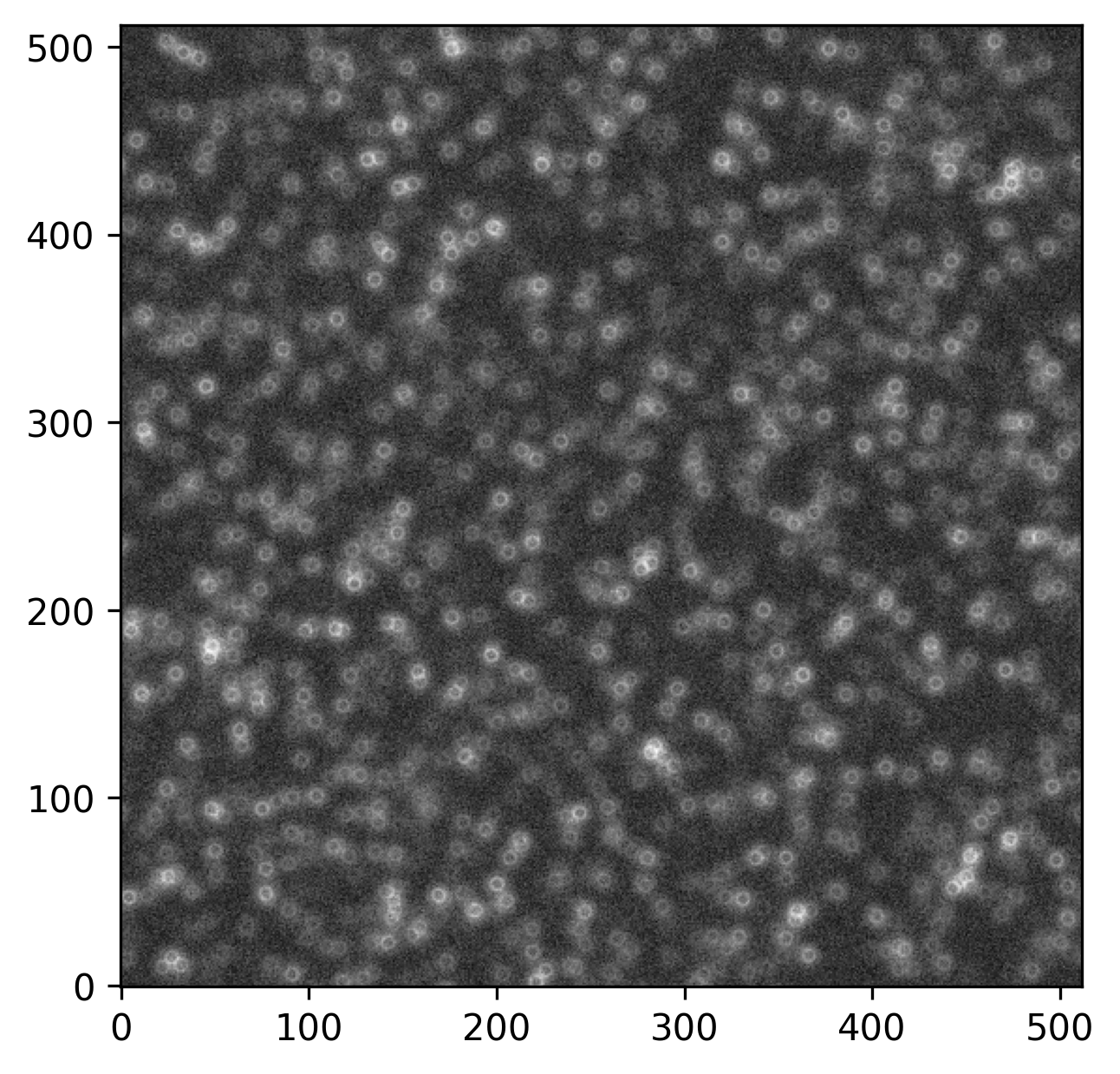
Here’s an example synthetic defocused PIV image with Gaussian noise added:
Example:
from pykitPIV import Image, Postprocess

# Upload saved images:
image = Image()
images_tensor_dic = image.upload_from_h5(filename='pykitPIV-dataset.h5')
images_tensor = images_tensor_dic['I']

# Initialize a postprocessing object:
postprocess = Postprocess(image_tensor, random_seed=100)

# Add defocus to the uploaded images:
postprocess.add_defocus(grid_size=256,
                        pupil_radius=72,
                        defocus_waves=1.0,
                        spherical_waves=0.0)
- Parameters:
grid_size – (optional)
intorfloatspecifying the grid size in pixels \([\text{px}]\) for the FFT.pupil_radius – (optional)
intorfloatspecifying the pupil radius, \(R\), in pixels \([\text{px}]\).defocus_waves – (optional)
intorfloatspecifying the defocus wave, \(d\). This adds a term proportional to \(\rho^2\) across the pupil and hence simulates the Zernike defocus.spherical_waves – (optional)
intorfloatspecifying the spherical wave, \(s\). This adds a term proportional to \(\rho^4\) across the pupil and hence simulates the spherical aberration.
- Returns:
point_spread_function_kernel -
numpy.ndarrayspecifying the point-spread function kernel that was computed, \(\text{PSF}\).
- pykitPIV.postprocess.Postprocess.add_gaussian_noise(self, loc=0.0, scale=(500, 1000), clip=None)
Adds Gaussian noise to the image tensor or any image-like array of size \((N, H, W)\) or \((N, 2, H, W)\).
Example:
from pykitPIV import Image, Postprocess

# Upload saved images:
image = Image()
images_tensor_dic = image.upload_from_h5(filename='pykitPIV-dataset.h5')
images_tensor = images_tensor_dic['I']

# Initialize a postprocessing object:
postprocess = Postprocess(image_tensor, random_seed=100)

# Add noise to the uploaded images:
postprocess.add_gaussian_noise(loc=0.0,
                               scale=(500,1000),
                               clip=2**16-1)
- Parameters:
loc – (optional)
intorfloatspecifying the center of the Gaussian distribution.scale – (optional)
tupleof two numerical elements specifying the minimum (first element) and maximum (second element) standard deviation for the noise on an image to randomly sample from. It can also be set tointorfloatto generate a fixed standard deviation value across all \(N\) image pairs. The unit of the standard deviation is image intensity.clip – (optional)
intorfloatspecifying whether maximum values on images should be clipped to a specified value. If set toNone, values are not clipped.
- pykitPIV.postprocess.Postprocess.add_shot_noise(self, strength=1, clip=None)
Adds shot noise to the image tensor or any image-like array of size \((N, H, W)\) or \((N, 2, H, W)\). The shot noise models a Poisson distribution of photons reaching the camera lens.
If \(\lambda\) is interpreted as the expected image intensity at a particular pixel, then the shot noise corrects that intensity by drawing the new intensity, \(k\), from the Poisson distribution:
\[f(k, \lambda) = \frac{\lambda^k e^{- \lambda}}{k!}\]where \(f\) denotes the probability of observing intensity \(k\), given the expected intensity \(\lambda\).
Example:
from pykitPIV import Image, Postprocess

# Upload saved images:
image = Image()
images_tensor_dic = image.upload_from_h5(filename='pykitPIV-dataset.h5')
images_tensor = images_tensor_dic['I']

# Initialize a postprocessing object:
postprocess = Postprocess(image_tensor, random_seed=100)

# Add shot noise to the uploaded images:
postprocess.add_shot_noise(strength=1,
                           clip=2**16-1)
- Parameters:
strength – (optional)
intorfloatspecifying the strength of the shot noise.clip – (optional)
intorfloatspecifying whether maximum values on images should be clipped to a specified value. If set toNone, values are not clipped.
- pykitPIV.postprocess.Postprocess.log_transform_images(self, addition=1)
Log-transforms image tensor or any image-like array of size \((N, H, W)\) or \((N, 2, H, W)\).
\[\mathbf{T}_{\text{log}} = \log_{10} (\mathbf{T} + a)\]Example:
from pykitPIV import Image, Postprocess

# Upload saved images:
image = Image()
images_tensor_dic = image.upload_from_h5(filename='pykitPIV-dataset.h5')
images_tensor = images_tensor_dic['I']

# Initialize a postprocessing object:
postprocess = Postprocess(image_tensor, random_seed=100)

# Create a log-transformation of image intensities:
postprocess.log_transform_images(addition=10000)
- Parameters:
addition – (optional)
intorfloatspecifying the added constant, \(a\), whose purpose is to eliminate zero elements in the images tensor.
- pykitPIV.postprocess.Postprocess.plot(self, original, idx, instance=1, xlabel=None, ylabel=None, xticks=True, yticks=True, title=None, vmin=None, vmax=None, cmap='Greys_r', cbar=False, figsize=(5, 5), dpi=300, filename=None)
Plots a single, post-processed static image. For PIV images, the user can select between \(I_1\) or \(I_2\).
- Parameters:
original –
boolspecifying whether the original or the post-processed image tensor should be plotted.idx –
intspecifying the index of the image to plot out ofn_imagesnumber of images.instance – (optional)
intspecifying whether \(I_1\) (instance=1) or \(I_2\) (instance=2) should be plotted.xlabel – (optional)
strspecifying \(x\)-label.ylabel – (optional)
strspecifying \(y\)-label.xticks – (optional)
boolspecifying if ticks along the \(x\)-axis should be plotted.yticks – (optional)
boolspecifying if ticks along the \(y\)-axis should be plotted.title – (optional)
strspecifying figure title.cmap – (optional)
stror an object of matplotlib.colors.ListedColormap specifying the color map to use.cbar – (optional)
boolspecifying whether colorbar should be plotted.figsize – (optional)
tupleof two numerical elements specifying the figure size as permatplotlib.pyplot.dpi – (optional)
intspecifying the dpi for the image.filename – (optional)
strspecifying the path and filename to save an image. If set toNone, the image will not be saved.
- Returns:
plt -
matplotlib.pyplotimage handle.