Class: Particle
- class pykitPIV.particle.ParticleSpecs(n_images=1, size=(512, 512), size_buffer=10, diameters=(3, 6), distances=(0.5, 2), densities=(0.05, 0.1), diameter_std=(0, 0.1), min_diameter=0.01, seeding_mode='random', dtype=<class 'numpy.float64'>, random_seed=None)
Configuration object for the
Particleclass.Example:
from pykitPIV import ParticleSpecs

# Instantiate an object of ParticleSpecs class:
particle_spec = ParticleSpecs()

# Change one field of particle_spec:
particle_spec.diameters = (2, 2)

# You can print the current values of all attributes:
print(particle_spec)
- class pykitPIV.particle.Particle(n_images, size=(512, 512), size_buffer=10, diameters=(3, 6), distances=(0.5, 2), densities=(0.05, 0.1), diameter_std=(0, 0.1), min_diameter=0.01, seeding_mode='random', dtype=<class 'numpy.float64'>, random_seed=None)
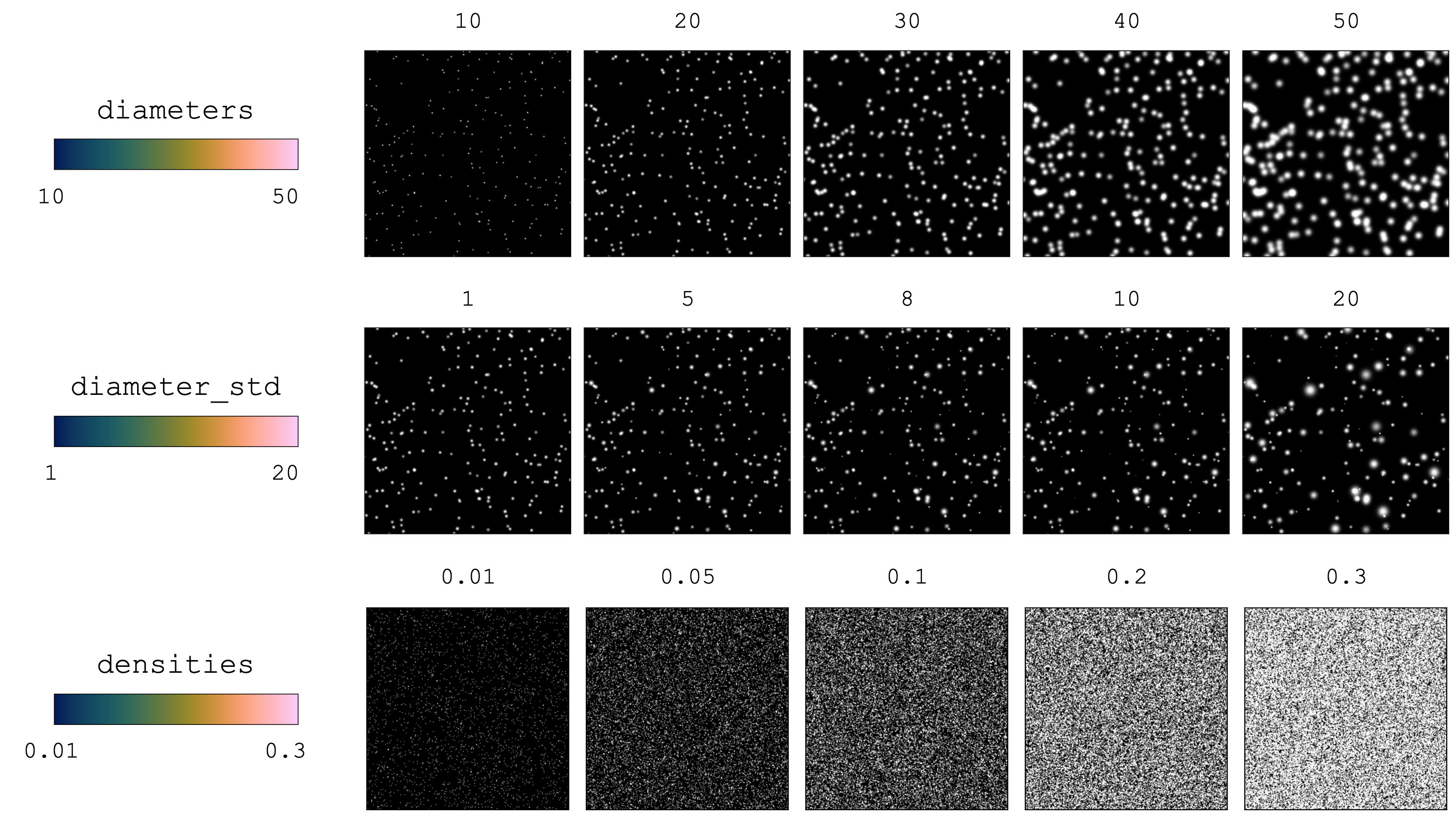
Generates tracer particles with specified properties for a set of \(N\) image pairs. This class generates the starting positions for tracer particles, i.e., the ones used for \(I_1\).
Example:
from pykitPIV import Particle
import numpy as np

# We are going to generate 10 PIV image pairs:
n_images = 10

# Specify size in pixels for each image:
image_size = (128, 512)

# Initialize a particle object:
particles = Particle(n_images=n_images,
                     size=image_size,
                     size_buffer=10,
                     diameters=(2, 4),
                     distances=(1, 2),
                     densities=(0.01, 0.05),
                     diameter_std=(0, 0.1),
                     min_diameter=0.1,
                     seeding_mode='random',
                     dtype=np.float32,
                     random_seed=100)

# Access particle coordinates on the first image:
(height_coordinates, width_coordinates) = particles.particle_coordinates[0]
Alternatively, all particle properties can also be made fixed across all \(N\) image pairs by passing integers or floats instead of tuples:
# Initialize a particle object:
particles = Particle(n_images=n_images,
                     size=image_size,
                     size_buffer=10,
                     diameters=2,
                     distances=1,
                     densities=0.1,
                     diameter_std=0.1,
                     min_diameter=0.1,
                     seeding_mode='random',
                     dtype=np.float32,
                     random_seed=100)
- Parameters:
n_images –
intspecifying the number of image pairs, \(N\), to create.size – (optional)
tupleof twointelements specifying the size of images in pixels \([\text{px}]\). The first number is the image height, \(H\), the second number is the image width, \(W\).size_buffer – (optional)
intspecifying the buffer, \(b\), in pixels \([\text{px}]\) to add to the image size in the width and height direction. This number should be approximately equal to the maximum displacement that particles are subject to in order to allow new particles to arrive into the image area and prevent spurious disappearance of particles near image boundaries.diameters – (optional)
tupleof two numerical elements specifying the minimum (first element) and maximum (second element) particle diameter in pixels \([\text{px}]\) to randomly sample from across all generated image pairs. Note, that one image pair will be associated with one (fixed) particle diameter, but the random sample between minimum and maximum diameter will generate variation in diameters across \(N\) image pairs. It can also be set tointorfloatto generate a fixed diameter value across all \(N\) image pairs. You can steer the deviation from that diameter within each single image pair using thediameter_stdparameter.distances – (optional)
tupleof two numerical elements specifying the minimum (first element) and maximum (second element) particle distances in pixels \([\text{px}]\) to randomly sample from. Only used whenseeding_modeis'poisson'. It can also be set tointorfloatto generate fixed distances across all \(N\) image pairs.densities – (optional)
tupleof two numerical elements specifying the minimum (first element) and maximum (second element) particle seeding density on an image in particle per pixel \([\text{ppp}]\) to randomly sample from. Only used whenseeding_modeis'random'. It can also be set tointorfloatto generate a fixed densities value across all \(N\) image pairs.diameter_std – (optional)
tupleof two numerical elements specifying the minimum (first element) and maximum (second element) standard deviation in pixels \([\text{px}]\) for the distribution of particle diameters within each image pair. If set to zero, all particles in an image pair will have diameters exactly equal. If the choice of thediameter_stdcauses any diameters to be negative, the diameters will be clipped such that the minimum diameter ismin_diameter. It can also be set tointorfloatto generate a fixed standard deviation value across all \(N\) image pairs.min_diameter – (optional)
floatorintspecifying the minimum particle diameter that will be used if the standard deviation (diameter_std) causes any diameters to be negative.seeding_mode –
(optional)
strspecifying the seeding mode for initializing particles in the image domain. It can be one of the following:'random','poisson', or'user'.'random'seeding generates random locations of particles on the available image area.'poisson'seeding is also random, but makes sure that particles are kept at minimumdistancesfrom one another. This is particularly useful when generating BOS images.'user'seeding allows for particle coordinates to be provided by the user. This provides an interesting functionality where the user can chain movement of particles and create time-resolved sequence of images.
dtype – (optional)
numpy.dtypespecifying the data type for particle coordinates. To reduce memory, you can switch from the defaultnumpy.float64tonumpy.float32.random_seed – (optional)
intspecifying the random seed for random number generation innumpy. If specified, all operations are reproducible.
Attributes:
n_images - (read-only) as per user input.
size - (read-only) as per user input.
size_buffer - (read-only) as per user input.
diameters - (read-only) as per user input.
distances - (read-only) as per user input.
densities - (read-only) as per user input.
diameter_std - (read-only) as per user input.
min_diameter - (read-only) as per user input.
seeding_mode - (read-only) as per user input.
dtype - (read-only) as per user input.
random_seed - (read-only) as per user input.
size_with_buffer - (read-only)
tuplespecifying the size of each image in pixels with buffer added.diameter_per_image - (read-only)
numpy.ndarrayspecifying the template for the particle diameters in pixels \([\text{px}]\) for each image. Template diameters are random numbers betweendiameters[0]anddiameters[1].distance_per_image - (read-only)
numpy.ndarrayspecifying the template for the particle distances in pixels \([\text{px}]\) for each image. Template distances are random numbers betweendistances[0]anddistances[1].density_per_image - (read-only)
numpy.ndarrayspecifying the template for the particle densities in particle per pixel \([\text{ppp}]\) for each image. Template densities are random numbers betweendensities[0]anddensities[1].n_of_particles - (read-only)
listspecifying the number of particles created for each image, \(n_i\), based on each template density.particle_coordinates - (read-only)
listoftupleof twonumpy.ndarrayspecifying the absolute coordinates of all particle centers for each image. The positions are computed based on theseeding_mode. Each tuple refers to one PIV image pair. The first element in each tuple are the coordinates along the image height, and the second element are the coordinates along the image width.particle_positions - (read-only)
numpy.ndarrayspecifying the per-pixel starting positions of all particles’ centers for each image pair; these positions will later populate the first image frame, \(I_1\). The positions are computed based on theseeding_mode. If a particle’s position falls into a specific pixel coordinate, this pixel’s value is increased by one. Zero entry indicates that no particles are present inside that pixel. This array has size \((N, C_{in}, H+2b, W+2b)\), where \(N\) is the number of image pairs, \(C_{in}\) is the number of channels (one channel, greyscale, is supported at the moment), \(H\) is the height and \(W\) the width of each image, and \(b\) is an optional image buffer. This array has typenumpy.int16.particle_diameters - (read-only)
listofnumpy.ndarray, each specifying the diameters of all seeded particles in pixels \([\text{px}]\) for each image based on each template diameter. Each array in this list has length \(n_i\).
- pykitPIV.particle.Particle.upload_particle_coordinates(self, particle_coordinates)
Uploads user-specified starting particle coordinates.
Note
Note that only the \(x\) and \(y\) coordinates get uploaded to the current
Particleclass object and particle diameters (Particle.particle_diameters) get computed for the user-specified particles from the class attributediametersthat was given duringParticleclass object generation.The number of particles per image (
Particle.n_of_particles) is computed directly from the user-specifiedparticle_coordinatesargument, so isParticle.particle_positions.Example:
from pykitPIV import Particle

# We are going to generate 10 PIV image pairs:
n_images = 10

# Specify size in pixels for each image:
image_size = (128, 512)

# Initialize the first particle object:
particles_1 = Particle(n_images,
                       size=image_size,
                       diameters=(2, 4),
                       diameter_std=(0, 1),
                       densities=(0.1, 0.1),
                       seeding_mode='random')

# Initialize the second particle object:
particles_2 = Particle(n_images,
                       size=image_size,
                       densities=(0.1, 0.1),
                       seeding_mode='random')

# Overwrite the coordinates in the first particle object with the second one:
particles_1.upload_particle_coordinates(particles_2.particle_coordinates)
Alternatively, you can instantiate an object of the
Particleclass with theseeding_mode='user', which will initially make all the particle parameters empty. Those parameters get populated the moment you call theupload_particle_coordinates()function.# Initialize the first particle object: particles_1 = Particle(n_images, size=image_size, diameters=(2, 4), diameter_std=(0, 1), seeding_mode='user') # Initially, all of these attributes will be None: particles_1.particle_coordinates particles_1.particle_positions particles_1.particle_diameters particles_1.n_of_particles # Initialize the second particle object: particles_2 = Particle(n_images, size=image_size, densities=(0.1, 0.1), seeding_mode='random') # Overwrite the coordinates in the first particle object with the second one: particles_1.upload_particle_coordinates(particles_2.particle_coordinates)
- Parameters:
particle_coordinates –
listoftuplespecifying the coordinates of particles in image \(I_1\). The first element in each tuple are the coordinates along the image height, and the second element are the coordinates along the image width. It can be obtained directly from an object of theMotionclass by accessing the attributeMotion.particle_coordinates_I1. This allows to have starting particle coordinates with a more irregular pattern.
- pykitPIV.particle.Particle.plot_properties(self, idx=None, c_hist='k', c_scatter='b', s=4, figsize=(5, 5), dpi=300, filename=None)
Plots statistical properties of the generated particles across all
n_imagesimages or a subset of those.Example:
from pykitPIV import Particle

# We are going to generate 100 PIV image pairs:
n_images = 100

# Initialize a particle object:
particles = Particle(n_images,
                     size=(200, 200),
                     size_buffer=10,
                     diameters=(1, 4),
                     distances=(1, 2),
                     densities=(0.05, 0.1),
                     diameter_std=(0, 0.1),
                     seeding_mode='random',
                     random_seed=100)

# Visualize properties on images indexed from 0 to 40:
particles.plot_properties(idx=(0, 40),
                          c_hist='k',
                          c_scatter='b',
                          s=30,
                          figsize=(15, 10),
                          dpi=300,
                          filename='Particle_plot_properties.png')
The code above will produce a figure like below:

- Parameters:
idx – (optional)
tupleorintspecifying the slice or the index of images whose properties to plot. If set toNone, properties of alln_imageswill be plotted.c_hist – (optional)
strspecifying the color of the histogram bars.c_scatter – (optional)
strspecifying the color of the scatter plots.s – (optional)
intorfloatspecifying the size of scatter pointsfigsize – (optional)
tupleof two numerical elements specifying the figure size as permatplotlib.pyplot.dpi – (optional)
intspecifying the dpi for the image.filename – (optional)
strspecifying the path and filename to save an image. If set toNone, the image will not be saved.
- Returns:
plt -
matplotlib.pyplotimage handle.